Price
$50-$100
Price
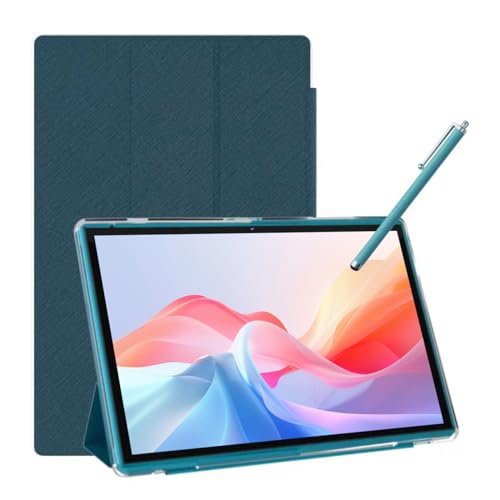
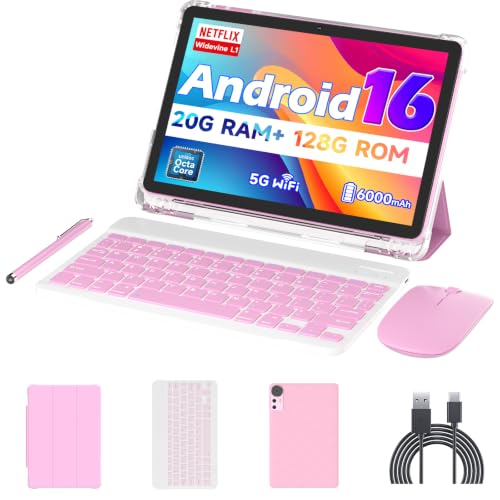
For a budget tablet that has to handle streaming, browsing, and a few workaday apps without feeling flimsy in daily use, the Frameflow P10_A makes a real case for itself. The appeal is the mix of Android 16, 128GB of storage, expandable memory, and a 10.1-inch 1280x800 IPS screen at a very low entry price. The trade-off is just as clear: this is not a premium media slate, and the screen size, basic resolution, and modest battery class set the ceiling for how far it can stretch.
Buy it if you want a simple Android tablet for home, travel, or light productivity and you value a clean setup with Google Play access, a case in the box, and enough storage headroom for everyday apps. Skip it if you need a sharper display, all-day endurance, or a tablet that feels clearly built for heavy multitasking. The strongest reason to choose it is value, while the main reason to pass is that its comfort zone stays in the budget lane.
| Screen size | 10.1 Inches |
|---|---|
| Resolution | 1280x800 Pixels |
| Chipset | Unisoc T310 |
| RAM | 16GB (4+12) |
| Storage | 128GB |
| Battery | 6600mAh |
The 10.1-inch IPS panel is the main reason this tablet feels usable for casual media and reading.
It gives you enough room for video, web pages, and split-screen basics without turning the device into a pocketable toy, and the 16:10 shape is friendly for everyday browsing. The trade-off is that 1280x800 is a budget-class resolution, so sharpness is fine for the price but not a reason to buy it over a better screen.
The 128GB built-in storage is a practical win at this price, especially with Android 16 and the Google Play Store in the mix.
It leaves room for apps, downloads, and family use without immediate storage anxiety, and the TF expansion support up to 1TB is the kind of flexibility that keeps a budget tablet useful longer. The catch is that expansion helps capacity more than speed, so it is a storage fix, not a performance upgrade.
Dual-band Wi-Fi, Bluetooth 5.0, GPS, and the included USB-C cable and case make this a straightforward tablet to put into service.
That matters because a budget slate gets judged on friction as much as on specs, and this one has the basics needed for streaming, accessories, and quick setup. The practical limit is that it stays in the simple-connectivity lane rather than offering premium extras.
On a couch or kitchen table, this is the kind of tablet that makes sense when you want a big enough screen for video, reading, and casual browsing without paying for a flagship panel. The 10.1-inch, 1280x800 IPS display gives you the familiar 16:10 tablet shape, and that works well for split use like a recipe on one side and a browser on the other. The limitation is plain too: the pixel density works out to about 149 ppi, so text and images land in the acceptable budget range rather than the crisp, high-end lane.
For light app switching, email, maps, and a few browser tabs, the Unisoc T310 plus the 16GB memory package is the part that keeps this tablet in the usable daily lane. It is the sort of setup that fits a ride-sharing dashboard, a pool-league scorer, or a casual home device better than a demanding work machine. The upside is that it has enough headroom for ordinary Android use and storage expansion up to 1TB, but the ceiling is still defined by the entry-level processor class, so this is a better fit for steady use than for pushing a lot at once.
Battery and portability land in the middle of the value story. The 6600mAh pack is sized for a few hours of video or a day of lighter mixed use, and the included case makes it easier to hand around the house or set on a table without feeling fragile. That said, the battery story is not the reason to buy it, and the included case adds convenience more than elegance. If your tablet lives near a charger or mostly moves between rooms, the balance works; if you want a long-haul travel companion, there are stronger options.
Community
The recurring pattern is easy to read: people are happiest when they use this tablet for straightforward jobs and treat it as a value buy, not a luxury device. The praise clusters around smooth enough performance, quick startup, the included case, and strong price-to-spec appeal, while the sharpest complaints come from touch responsiveness and the basic nature of the display and build.
| Attribute | Frameflow P10_A Current | NOVOJOY ZB10 |
|---|---|---|
| Price | $69.99 | $59.99 |
| Screen size | 10.1 Inches | 10 inches |
| Resolution | 1280x800 Pixels | 1280 x 800 pixels |
| RAM | 16GB (4+12) | 8 GB |
| Storage | 128GB | 32 GB |
| Battery | 6600mAh | 6000mAh |
| Editorial score | 60/100 | 59/100 |
Against the COOPERS CP10, this Frameflow looks like the better value route if you want more memory and a more current Android experience in a similar 10-inch, 1280x800 class. The COOPERS model’s 32GB storage and 6000mAh battery keep it in a tighter budget lane, while this Frameflow has more room to breathe for apps and downloads. Choose the Frameflow if storage and software freshness matter more than bare-minimum cost, and choose the COOPERS if you only need the simplest low-cost slate.
Compared with the NOVOJOY ZB10, the Frameflow is the more storage-forward option, since both sit in the same 10-inch, 1280x800 territory but the NOVOJOY is listed with 8GB RAM and 32GB storage. That makes the Frameflow easier to recommend for buyers who keep more apps, files, or offline media on hand. If your priority is just a basic family or media tablet, the NOVOJOY route can still make sense, but the Frameflow has the clearer headroom story.
An Amazon Fire 7 Kids is a different buying lane altogether, built around a smaller 7-inch screen and a child-focused experience rather than a general-purpose 10-inch Android tablet. The Frameflow is the better pick for adults who want a larger display, Google Play access, and more flexible everyday use. The Fire route makes more sense if kid-oriented simplicity and a smaller footprint matter more than screen area.
Compare with
Add a second model to activate the direct comparison.
No products match that filter combination.
The Frameflow P10_A makes the most sense for buyers who want a low-cost Android tablet with real everyday usefulness, not a stripped-down toy. Android 16, 128GB of storage, expandable memory, dual-band Wi-Fi, Bluetooth 5.0, and the included case give it a practical edge for home use, casual streaming, and light productivity. If the current offer is close to the deal pricing here, it is an easy value pick in the budget tablet lane. The reservation is the same one that matters on the desk: the display is functional rather than premium, and the battery and build story stay firmly in the value class. That is fine for buyers who want a simple tablet for a few recurring tasks, but it is the wrong choice if you need a sharper screen, a more refined feel, or longer unplugged sessions. For those users, a better-positioned tablet is worth the extra spend.
Yes. It fits browsing, streaming, reading, maps, and simple apps better than demanding multitasking or laptop-style work.
Yes. The 128GB base storage is practical, and TF expansion up to 1TB gives it much more room for downloads, media, and app installs.
Review published on