RAM
20 GB
RAM
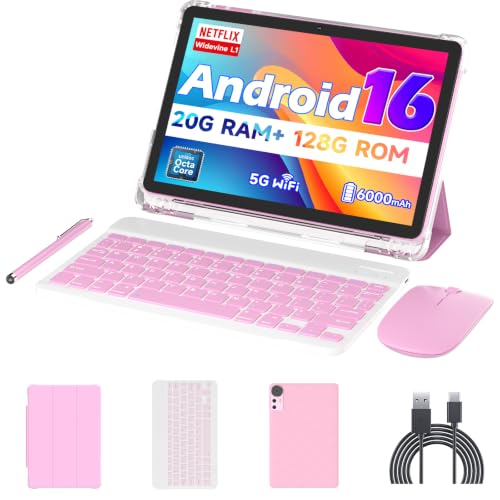
If you want a budget Android tablet that comes ready for light work and casual entertainment, the Nyxolaria CP31M is relevant because it bundles the tablet, keyboard, mouse, case, and stylus into one low-cost setup. That makes it a practical starter kit for browsing, streaming, note-taking, and family use, but the trade-off is that the screen is only 10.1 inches at 1280 x 800, so it is built for everyday comfort rather than sharp, premium display detail.
I would point this at buyers who want a simple, all-in-one tablet package for media and basic productivity, especially if the included accessories matter more than chasing a faster or more polished slate. Skip it if you need a tablet that feels consistently quick under heavier work, because the mixed performance feedback and the modest resolution keep this in the value lane, not the laptop-replacement lane.
| Screen size | 10.1 Inches |
|---|---|
| Resolution | 1280X800 Pixels |
| RAM | 20GB (4+16Expand) |
| Storage | 128 GB |
| Battery | 6000mAh |
| Panel type | IPS |
The tablet arrives with a keyboard, mouse, case, stylus, and cable, which turns the purchase into a ready-to-use starter setup instead of a bare tablet.
That is the main reason it looks attractive at this price, because you avoid piecing together accessories later. The trade-off is that the accessories set the tone for the whole product: useful for convenience, but not the same as premium input gear.
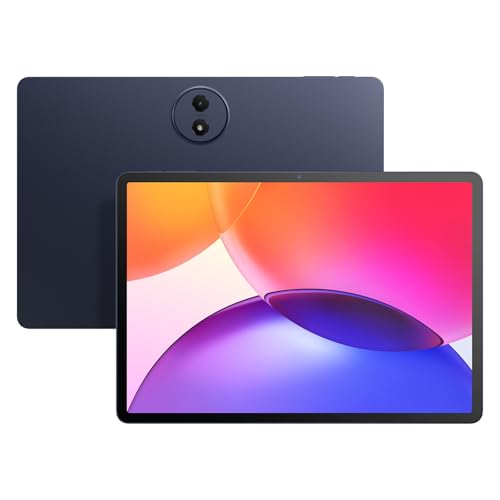
The 10.1-inch IPS display at 1280 x 800 is aimed at comfortable everyday viewing, not sharp detail work.
It is a practical size for streaming, browsing, and reading on a lap or table, and the 16:10 shape keeps it friendly for mixed media use. The limitation is simple: if you care a lot about crisp text or high-end image clarity, this screen is functional rather than impressive.
The Android 16 platform and advertised 20GB memory setup give the tablet enough headroom for the kind of app switching most buyers expect from a budget slate.
That helps the CP31M feel more current than older entry-level tablets, especially when you are moving between browser tabs, media apps, and basic productivity tools. The real-world caution is that the experience still depends on the tablet’s overall tuning, and the mixed performance feedback keeps expectations grounded.
The 6000mAh battery and compact 10.1-inch size make this an easy carry for commuting, casual travel, or moving around the house.
That combination supports the tablet’s best role: a grab-and-go screen for entertainment, reading, and light work away from a desk. It is not the kind of battery story that changes the category, but it does fit the price and the use case well.
On a couch or kitchen table, this is the kind of tablet that makes sense when you want one device to cover video, web browsing, and a little typing without building a setup from scratch. The 10.1-inch 16:10 screen gives you a familiar handheld format, and the 1280 x 800 panel works out to about 149 ppi, which is fine for streaming and reading but not the sort of crispness that makes text or photos feel especially refined. That puts the CP31M in the comfortable utility zone: good enough for relaxed daily use, not a display-first pick.
For light office-style tasks, the included keyboard and mouse change the value story more than the raw tablet hardware does. The package is clearly meant to move between tablet and desk mode, and that matters because it lowers the friction of setup for school notes, emails, and quick documents. The upside is convenience; the downside is that this is still a compact, budget accessory bundle, so long typing sessions and serious multitasking are better treated as occasional use than as the core reason to buy it.
Battery life and portability round out the picture. A 6000mAh battery is a sensible match for a low-cost 10-inch slate, and the recurring feedback around easy setup, decent battery life, and solid value fits that role well. At the same time, the mixed performance reports matter: some owners get a smooth enough experience for video, apps, and casual browsing, while others run into lag and connectivity frustration. That split makes the CP31M a better fit for media and simple daily tasks than for anyone who needs a consistently fast work tablet.
Community
The pattern is straightforward: people are happiest when they treat this as a good-value bundle for video, browsing, and casual use, and they get frustrated when they expect laptop-like speed or a premium accessory experience. The practical lesson is that the tablet itself is the main value, while the keyboard, mouse, and case make the package more convenient than they make it more powerful.
We’ll have had this for about 10 days. Very satisfied with it so far. For the price you get a decent device and the battery life is good about a day on a single charge.
Nice tablet. I was very impressed with how good this was for the money. I don’t do a lot of gaming but the games I do play ran smoothly. I also streamed Netflix on it with no issues.
I love the tablet. The Bluetooth keyboard is a bit slow, but I certainly can’t type fast anyway.
| Attribute | Nyxolaria CP31M Current | Bnegynng CP31M | Vyrolinia ZB32 | Suicoey P30 |
|---|---|---|---|---|
| Price | $72.99 | $72.99 | $59.99 | $99.99 |
| Screen size | 10.1 Inches | 10 inches | 10 inches | 10 inches |
| Resolution | 1280X800 Pixels | 1280 x 800 pixels | 1280 x 800 | 1280x800 pixels |
| RAM | 20GB (4+16Expand) | 20 GB | 12 GB | - |
| Storage | 128 GB | 128 GB | 64 GB | 256 GB |
| Battery | 6000mAh | 6000 mAh | 6000mAh | 8000mAh |
| Editorial score | 64/100 | 60/100 | 61/100 | 64/100 |
Against the Bnegynng CP31M, this Nyxolaria model sits in the same broad value-tablet lane with the same 10-inch class screen, 1280 x 800 resolution, 20GB RAM, and 128GB storage. The choice comes down to package and confidence in the overall setup rather than a major spec gap. If you want the most straightforward bundled starter kit, the Nyxolaria makes the stronger case; if you are comparing purely on core tablet hardware, they are close enough that the accessory experience and price deal the real blow.
Frameflow P10_A is the cleaner pick for buyers who want a more defined hardware route, because its known Unisoc T310 chipset and 16GB memory setup make the positioning easier to read even though it gives up some memory on paper. By contrast, the Nyxolaria leans harder into the accessory bundle and the higher advertised RAM figure. That makes Nyxolaria better for buyers who value the included keyboard and mouse, while Frameflow is the more sensible lane if you prefer a clearer, simpler tablet core over a bundle-first pitch.
Compare with
Add a second model to activate the direct comparison.
No products match that filter combination.
The Nyxolaria CP31M makes the most sense for buyers who want a low-cost Android tablet package that is ready for streaming, browsing, reading, and occasional typing right out of the box. The included accessories, 128GB storage, 20GB advertised memory, and 6000mAh battery give it a strong value story for home use and travel, and the current offer is the kind of deal that works best when convenience matters more than polish. If you need a tablet for heavier work, fast multitasking, or a sharper screen, this is the one to skip. The mixed performance reports and the 1280 x 800 panel keep it firmly in the budget lane, so the right buyer is someone who wants a practical bundle at a low price and can live with a few compromises.
It is mainly a media-and-light-productivity tablet, with the bundled keyboard and mouse making casual typing easier but not turning it into a full work machine.
No, the case and keyboard add convenience, but the tablet still behaves like a budget 10.1-inch slate with modest resolution and mixed performance.
Review published on