Price
$50-$100
Price
If you want a cheap Android tablet that can pull double duty as a small typing setup, this Vyrolinia ZB32 is relevant because it bundles the keyboard, mouse, stylus, and case instead of making you build the kit yourself. The real appeal is the low entry price paired with Android 16, 12GB of installed-and-extended memory, and expandable storage, but the trade-off is that this is still a budget 10-inch tablet with a 1280 x 800 screen and a battery story that does not read like an all-day workhorse.
I’d put this in the buy lane for casual streaming, browsing, school basics, and light home productivity, especially if the accessories matter more to you than raw speed. Skip it if you want a tablet that feels consistently fast under heavier multitasking or if long unplugged use is the main goal, because the mixed reliability and battery feedback make this more of a value play than a confidence-first pick.
| Screen size | 10 inches |
|---|---|
| Resolution | 1280 x 800 |
| RAM | 12 GB |
| Storage | 64 GB |
| Battery | 6000mAh |
| Refresh rate | 60 Hz |
The tablet runs Android 16, which matters because it keeps the interface current and gives you the normal Google Play app path for streaming, social apps, reading, and basic family use.
For a buyer, that makes setup and app access feel straightforward rather than experimental. The upside is a familiar Android routine; the limitation is that this is still a budget tablet experience, so the software advantage does not erase the modest screen and battery class.
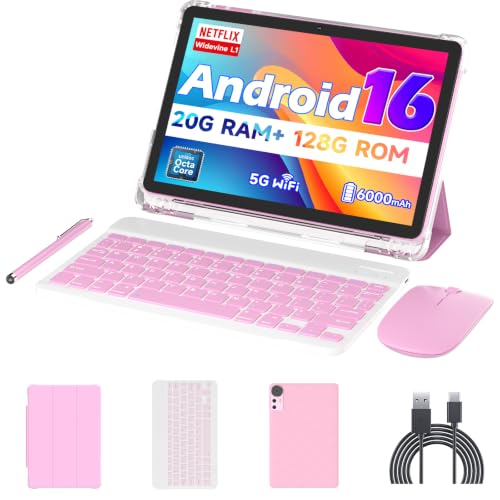
The package includes a keyboard, mouse, stylus, protective case, and USB-C cable, so the tablet arrives as a ready-to-use 2-in-1 setup instead of a bare slate.
That matters most if you want one purchase to cover typing, tapping, and casual note-taking. The practical trade-off is that the accessories make the bundle more useful than a plain tablet, but they do not turn it into a premium laptop replacement.
The tablet starts with 64GB of internal storage and supports microSD expansion up to 1TB, which gives you room for apps, downloads, photos, and offline media without living on the edge.
That is a real help on a budget Android tablet, where storage pressure can show up fast. The upside is flexibility for family sharing and media use; the caution is that the base storage is still modest, so expansion is the safety net, not the core of the experience.
Wi-Fi 6 and Bluetooth 5.0 make the tablet easier to place in a modern home setup, especially if you expect it to hop between streaming, wireless accessories, and routine browsing.
That combination supports the tablet’s value story because it keeps the device connected in the ways most buyers will actually use it. The limitation is simple: connectivity helps convenience, but it does not change the tablet’s budget-class display and battery behavior.
On a couch or kitchen table, the ZB32 makes the most sense as a simple media-and-notes machine. The 10-inch, 16:10 display gives you a familiar tablet shape for reading and video, and the 1280 x 800 resolution works best when you keep expectations in the everyday lane rather than the sharpness lane. That works fine for Netflix, YouTube, web browsing, and kid-friendly use, but it is not the kind of panel that turns a cheap tablet into a premium-feeling screen-first device.
For light typing, the included keyboard and mouse change the value equation more than the spec sheet does. This is the kind of bundle that can cover homework, scheduling, emails, and quick document work without forcing an extra purchase, which is why the product lands better as a small productivity helper than as a true laptop substitute. The catch is that the keyboard route only pays off if you are comfortable with a compact, budget accessory setup rather than a polished desktop-style experience.
Battery life is the main place where the trade-off becomes obvious. The 6000mAh pack is enough for casual use, and one buyer reported a full day with normal use, but the broader pattern is mixed enough that I would not plan on long unplugged sessions. If you mostly use it near a charger, the value holds up; if you need a tablet for travel days or long stretches away from power, this is the part of the package that narrows the fit fastest.
Community
The pattern here is easy to read: people who want a low-cost tablet for simple daily use tend to be satisfied, especially when the keyboard and mouse make the bundle feel complete. The disappointments cluster around battery life, speed, and occasional reliability issues, so the practical lesson is that this is a good value-first buy only if you are comfortable with some unevenness.
I’ve been using this tablet for a few weeks now and honestly it’s been a really solid purchase. The screen is clear and bright, and it’s fast enough for everyday stuff like streaming, emails, light gaming, and some.
It works really well for the price.
The tablet was super slow and had several scratches on the screen when I opened it.
| Attribute | Vyrolinia ZB32 Current | Nyxolaria CP31M | Bnegynng CP31M | Suicoey P30 |
|---|---|---|---|---|
| Price | $59.99 | $72.99 | $72.99 | $99.99 |
| Screen Size | 10 inches | 10.1 Inches | 10 inches | 10 inches |
| Resolution | 1280 x 800 | 1280X800 Pixels | 1280 x 800 pixels | 1280x800 pixels |
| RAM | 12 GB | 20GB (4+16Expand) | 20 GB | - |
| Storage | 64 GB | 128 GB | 128 GB | 256 GB |
| Battery | 6000mAh | 6000mAh | 6000 mAh | 8000mAh |
| Editorial score | 61/100 | 64/100 | 60/100 | 64/100 |
Against the NOVOJOY ZB10 and COOPERS CP10, the Vyrolinia wins on bundle completeness and route flexibility. Those alternatives are more bare-bones by comparison, with 10-inch 1280 x 800 screens and lower memory or storage on the NOVOJOY side, while the COOPERS model is also centered on a 6000mAh battery. If your priority is getting a ready-to-use typing setup at a low price, the ZB32 is the more practical lane.
The JIKOCXN K10 is the more obvious pick if you care more about storage headroom, since it offers 128GB and 12GB RAM in a similar 10-inch, 1280 x 800 class. That makes it the cleaner choice for buyers who want a little more breathing room for apps and files, while the Vyrolinia stays attractive for shoppers who value the included keyboard, mouse, stylus, and case as part of the deal rather than buying those pieces separately.
Compare with
Add a second model to activate the direct comparison.
No products match that filter combination.
The Vyrolinia ZB32 makes the most sense for buyers who want a very affordable Android tablet that already includes the accessories needed for light typing and shared household use. The Android 16 software, expandable storage, and 2-in-1 bundle give it a stronger everyday value story than a bare tablet at this price, and if you check the current offer, it is easy to see why it lands as a practical budget pick. If you need a tablet for long battery life, consistently smooth performance, or a more refined screen, this is not the safest route. The battery and reliability mix are the real reservations, and they matter most for commuters, heavier multitaskers, and anyone who wants a device that disappears into the background instead of asking for compromises.
Review published on