Ranking medal
Silver in Best value
This product is top 2 in a published dynamic ranking.
Ranking medal
This product is top 2 in a published dynamic ranking.
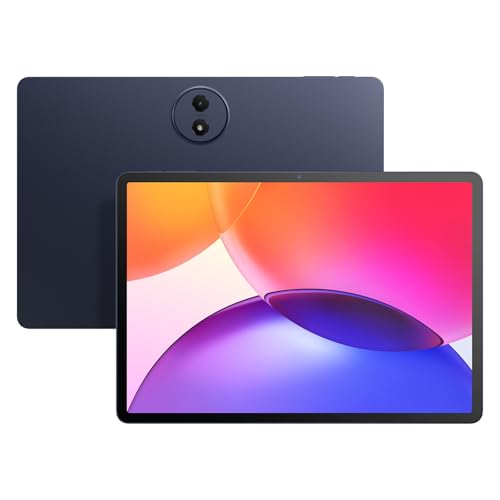
If you want a study-friendly Android tablet that already comes with the pen and folio case, the Lenovo Idea Tab lands in a useful middle lane: it is built for note-taking, streaming, and light school or household work without asking you to buy the basics separately. The 11-inch 2.5K IPS screen, 90Hz refresh rate, and included accessories make it immediately relevant for students and families who want a ready-to-use setup, but the 4 GB memory keeps it from feeling like a no-compromise multitasking machine.
This is the kind of tablet to buy when you care more about clear visuals, easy handwriting, and everyday convenience than about heavy app juggling. Skip it if your tablet needs are closer to a small laptop replacement, because the memory ceiling and the tablet-first approach set a clear limit on how far it can stretch under pressure.
| Screen size | 11 Inches |
|---|---|
| Resolution | 2560 x 1600 |
| Chipset | MediaTek Dimensity 6300 |
| RAM | 4 GB |
| Refresh rate | 90 Hz |
| Panel type | IPS |
The 11-inch 2.5K IPS display and included Tab Pen are the heart of the package, and they change the buying decision more than the brand name does.
For reading, handwriting, and quick markup, the sharper panel and pen support make the tablet feel built for schoolwork instead of merely compatible with it. The catch is that the same setup rewards focused use more than crowded multitasking, so it fits note-taking and light organization better than constant app switching.
The folio case is included, which matters because it removes one of the usual extra purchases on day one.
That makes the Idea Tab easier to place in a student bag or family routine right away, and the stand-style case adds practical value for sketching or watching video. The limitation is that the bundled convenience is only as useful as the tablet’s light-duty performance envelope, so it is a better value for focused use than for demanding workloads.
The MediaTek Dimensity 6300 and 4 GB of memory put this tablet in the responsive budget-to-midrange lane rather than the high-pressure lane.
That combination lines up with the strong display and easy setup comments in the review pattern, which is why the tablet reads as smooth for browsing, streaming, and school apps. The ceiling shows up when many apps stay open at once, so the right buyer is the one who wants a clean daily tablet, not a mini workstation.
Quad Dolby Atmos-tuned speakers and the quoted 12-hour YouTube figure make the Idea Tab feel tuned for the couch, dorm room, or kitchen counter.
That is a real advantage for streaming, video lessons, and shared household use, where sound quality and not running for the charger matter more than raw power. The practical caution is simple: the battery story is strongest in media use, not in heavy mixed workloads that keep the screen and processor busy all day.
On a desk with a notebook, a browser, and a video open, the Idea Tab makes its case fast: the 11-inch 2.5K panel gives text enough sharpness to read comfortably, and the 90Hz refresh rate helps swiping and app switching feel less sticky than on a basic budget slate. That matters most when the tablet is being used for class notes, recipes, or casual browsing, because the screen quality does a lot of the day-to-day heavy lifting here. The trade-off is obvious too: 4 GB of memory is fine for a light study load, but it is not the kind of headroom that encourages piling on heavy multitasking.
When the pen comes into play, the route becomes clearer. The included Tab Pen and the folio case turn this into a practical handwriting tablet rather than a bare screen you have to accessorize later, and that fits the student and light productivity brief well. It is the kind of setup that makes quick annotations, sketches, and short written sessions feel natural, especially with the Circle to Search and note-taking apps built into the experience. What it does not do is erase the tablet boundary; this is still a light-work device, not a full desktop substitute.
Battery and sound round out the daily-use story. Lenovo claims up to 12 hours of YouTube and includes a 20W charger, which makes sense for a tablet meant to move between sofa, backpack, and desk without becoming a charging ritual. The quad Dolby Atmos-tuned speakers also matter in practice because a study break or streaming session benefits from clear, room-filling audio instead of thin tablet sound. The practical limit is that this is a convenience-first machine, so buyers who want all-day heavy use with lots of app pressure will feel the 4 GB ceiling before they feel the battery promise.
Community
The pattern is straightforward: people are happiest when they use this as a sharp, easy tablet with the pen and case doing real work, and they get less patient when they push it like a heavier multitasker. The practical lesson is that the accessory bundle and display are the main value drivers, while the 4 GB memory is the part that decides whether the tablet feels pleasantly light or frustratingly narrow.
I bought this to replace my Amazon Tablet because there is no Youtube TV App on the Amazon Fire Tablet. It has become much more than just a streaming device, and the pen makes it useful in ways I did not expect.
This tablet is great in every way, responsive, fast, crisp screen and graphics, reliable, easy to use. I really appreciate getting the stylus with it.
These were affordable and well worth the purchase. The resolution on the screen is unbeatable for the price point, and the flap cover case and pen were both good quality.
So far this has been a great tablet, but it has one weird drawback. It refuses to allow the installation of the Amazon shopping app, so we are using the web version for now.
| Attribute | Lenovo Idea Tab Current | VisuPad P60 | Lenovo Idea Tab 11 | TCL TAB A1 Plus |
|---|---|---|---|---|
| Price | $149.99 | $129.99 | $199.99 | $219.99 |
| Screen Size | 11 Inches | 10 inches | 11 Inches | 12.2 inches |
| Resolution | 2560 x 1600 | 1280x800 pixels | 2560 x 1600 | 2400 x 1600 pixels |
| Panel Type | IPS | - | IPS | - |
| Refresh Rate | 90 Hz | - | 90Hz | 120Hz |
| RAM | 4 GB | 26 GB (4 GB physical + 22 GB virtual) | 8 GB | 16GB RAM (6GB+10GB) |
| Editorial score | 79/100 | 63/100 | 90/100 | 80/100 |
Against the FEONAL 11-inch Android 16 tablet, the Lenovo looks more convincing for buyers who care about a cleaner screen-and-pen route. FEONAL leans on a very high RAM figure and a basic 1280x800 HD panel, while the Lenovo’s sharper 2560 x 1600 display and included stylus bundle make more sense for reading, note-taking, and media first use. Choose FEONAL if raw memory is the main attraction; choose the Lenovo if the screen and accessory package matter more.
Compared with the TCL TAB A1 Plus, the Idea Tab is the more focused student-and-couch tablet, while TCL’s larger 12.2-inch format gives more room if screen area is the whole game. TCL also brings a higher-memory, larger-panel route, but the Lenovo counters with the ready-made pen-and-folio setup and a more compact 11-inch body that is easier to carry and hold. Pick TCL for bigger-screen home use; pick Lenovo for a more portable study tablet with a clearer accessory story.
Compare with
Add a second model to activate the direct comparison.
No products match that filter combination.
The Lenovo Idea Tab makes the most sense for students, casual note-takers, and families who want a sharp 11-inch tablet with the pen and folio already included. The display quality, 90Hz refresh rate, and speaker setup give it a polished everyday feel, and the current offer makes the bundle especially easy to justify if you want a ready-to-use tablet without extra accessory shopping. If you need a tablet for heavier multitasking, long app sessions, or laptop-like work, this is not the cleanest fit. The 4 GB memory is the main limit, and that matters most for buyers who keep lots of apps open or expect desktop-style flexibility; for everyone else, the Idea Tab is a sensible buy at the current offer, taxes may apply and shipping.
It works best as a study-friendly media tablet, with the pen, folio case, and sharp 11-inch display doing the most to support notes, reading, and streaming.
No, it fits light productivity well, but the 4 GB memory and tablet-first setup make it a better companion device than a laptop substitute.
Review published on