RAM
20 GB
RAM
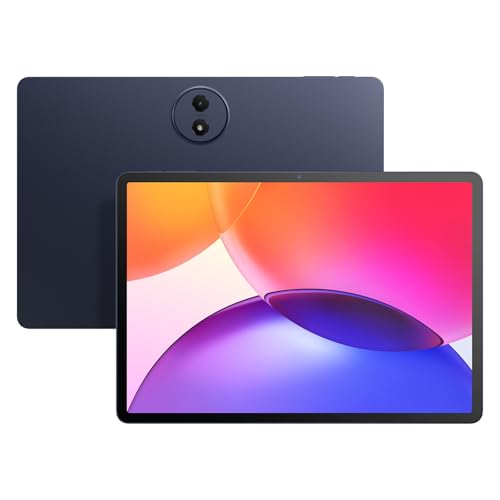
If you want a budget Android tablet that arrives as a ready-to-use family bundle, this Bnegynng CP31M makes sense right away: it pairs a 10-inch 1280 x 800 IPS screen with a keyboard, mouse, stylus, and case, so the first decision is less about buying accessories and more about whether the screen class and entry-level hardware fit your daily routine. The trade-off is equally clear. At this price, you are buying convenience and extras, not a premium display or a high-end tablet platform.
I would put this in the hands of someone who wants streaming, browsing, light schoolwork, and casual app use in one inexpensive package, especially if the included keyboard and stylus matter more than raw speed. Skip it if you need a sharper panel, a more serious productivity tablet, or a device that has to feel premium in long sessions. The 20GB memory figure is attractive on paper, but the real value here comes from the bundle and the simple, low-risk everyday use it supports.
| Screen size | 10 inches |
|---|---|
| Resolution | 1280 x 800 pixels |
| RAM | 20 GB |
| Storage | 128 GB |
| Battery | 6000 mAh |
| Operating system | Android 16 |
The keyboard, mouse, stylus, case, charger, and cable are part of the package, which matters because it removes the usual add-on cost and setup hassle.
For a parent, student, or casual home user, that makes the tablet easier to put into service on day one. The trade-off is that the bundle adds convenience, not premium input feel, so it helps most when the goal is light productivity and shared use.
The tablet runs Android 16 and is Google GMS certified, so the app side is straightforward for mainstream Android use.
That is important for buyers who want familiar apps, easy downloads, and a device that does not need extra platform learning. The practical caveat is that this is still an entry-level Android tablet, so the software advantage is about access and simplicity, not desktop-like power.
Widevine L1 support makes it more comfortable as a streaming tablet, and WiFi 6 with Bluetooth 5.0 gives it the connectivity basics most households expect.
That combination matters most when the tablet spends time on video, browsing, and casual wireless peripherals. The upside is smoother everyday media use; the limitation is that the display resolution still sets the ceiling on how refined that media looks.
The memory figure is split between physical RAM and virtual memory, while 128GB of storage gives the tablet enough room for apps, photos, and downloads before expansion.
For buyers who keep many apps open or want a roomy starter device, that is a useful value signal. The practical caution is that the headline memory number is not the same as true high-end performance, so the storage and bundle help more than they transform the tablet into a speed-focused machine.
On a couch or kitchen table, this tablet is built for the kind of use where you open a few apps, watch a show, answer messages, and move on. The 10-inch, 16:10 screen keeps the format comfortable for casual reading and video, while the 1280 x 800 resolution works out to roughly 149 ppi, which is fine for everyday media but not the crispest choice if you spend a lot of time staring at text. That makes it a better fit for relaxed home use than for someone who is picky about sharpness.
For typing homework, quick email, or a shared household setup, the included keyboard, mouse, stylus, and protective case change the value story more than the chip name does. You get a ready desk setup without adding extra purchases, and that matters when the goal is a simple second device rather than a laptop replacement. The limitation is that the keyboard bundle does not turn this into a full productivity machine; it lowers the friction for light work, but the screen and tablet-class platform still keep expectations in the basic lane.
Battery life is the other place where the fit becomes practical instead of theoretical. The 6000 mAh battery and the stated 8-hour average life line up with the kind of day-part use this tablet is aimed at, and one review describing several movies on a charge matches that casual-media role. That is enough for a school afternoon, travel downtime, or a long evening on the sofa, but it is not the kind of endurance that makes charging feel irrelevant. If you want a tablet that can sit in a bag all day and disappear into the background, the battery class is acceptable; if you want a truly all-day work companion, this is not the strongest route.
Community
The strongest buying pattern here is simple: people respond to the bundle, the cute pink finish, and the low price, while the main disappointment risk is that the hardware still lives in the budget-tablet lane. That makes it a smart buy for casual home use and a weaker one for anyone hoping the accessories alone will make it feel like a laptop.
So impressed with what you get for the price. It’s so cute with the pink, and the matching pink mouse, wireless keyboard, and stylus. Such a good value for the price.
Really nice computer.
My grand daughter loves it. And if she don’t complain it must be good.
This is one of the best tablets I’ve ever owned. The battery lasts me through several movies, the screen size is great, and it connects to the internet fast.
| Attribute | Bnegynng CP31M Current | Nyxolaria CP31M | Vyrolinia ZB32 | VisuPad P60 |
|---|---|---|---|---|
| Price | $71.99 | $73.99 | $59.99 | $109.98 |
| Screen size | 10 inches | 10.1 Inches | 10 inches | 10 inches |
| Resolution | 1280 x 800 pixels | 1280X800 Pixels | 1280 x 800 | 1280x800 pixels |
| RAM | 20 GB | 20GB (4+16Expand) | 12 GB | 26 GB (4 GB physical + 22 GB virtual) |
| Storage | 128 GB | 128 GB | 64 GB | 256 GB |
| Battery | 6000 mAh | 6000mAh | 6000mAh | 8000mAh |
| Operating system | Android 16 | - | - | Android 16 |
| Editorial score | 65/100 | 67/100 | 65/100 | 66/100 |
Against the URAO X109, this Bnegynng leans harder into the all-in-one bundle. The URAO has a similar 10.1-inch, 1280 x 800, 2.0 GHz octa-core setup and a very aggressive 30GB RAM claim, so it is the route for buyers chasing the biggest headline memory number. The Bnegynng is the better pick when the included keyboard, mouse, stylus, and case matter more than chasing a spec-sheet arms race.
Compared with the NOVOJOY ZB10, which also sits in the 10-inch, 1280 x 800 lane but with 8GB RAM and 32GB storage, the Bnegynng offers more storage headroom and a much richer accessory bundle. That makes it the stronger family or starter-tablet choice. If you want a simple, low-cost media tablet and do not care about extras, the cheaper-feeling route can still make sense; if you want the tablet to arrive ready for light work and shared use, this one is easier to justify.
Compare with
Add a second model to activate the direct comparison.
No products match that filter combination.
Buy the Bnegynng CP31M if you want a budget Android tablet that arrives as a usable family bundle and you care more about convenience than chasing a faster chip or a sharper panel. It is the better fit for streaming, browsing, homework, note-taking, and shared household use because the keyboard, mouse, stylus, and case remove extra purchases and make day-one setup easy. The one trade-off that most changes the decision is the display-and-performance ceiling: the 1280 x 800 screen and budget-class speed are acceptable for casual use, but they will not satisfy buyers who expect crisp text, premium feel, or real laptop-like productivity.
Skip it if your priority is a tablet that feels refined for long reading sessions, heavy multitasking, or all-day work away from a charger. The Bnegynng CP31M makes sense when the bundle is the value, not when raw hardware is the main reason to buy, and that is why it lands best as a low-risk starter or family tablet rather than a serious productivity machine. If you can live with the modest screen and battery class in exchange for a ready-to-use package, it is an easy recommendation; if those limits would annoy you every day, look elsewhere.
It is mainly a media and light productivity tablet, with the keyboard and stylus making it easier to handle email, homework, and simple notes.
Yes. The keyboard, mouse, stylus, and case are the main reason to choose it over a bare-budget tablet, because they reduce extra cost and setup friction.