Battery
8000 mAh
Battery
If you want a budget tablet that already comes with the keyboard, mouse, stylus, and case, the VisuPad P60 lands in a very practical lane for schoolwork, casual streaming, and family use. Its 10-inch screen, Android 16, and 256 GB of built-in storage make it easy to place as an all-in-one starter setup, but the real trade-off is that this is still a compact 1280x800 tablet, not a premium display-first slate.
Buy it if you want a ready-to-use Android bundle for browsing, video, notes, and light productivity without spending much. Skip it if you need a sharper screen, a more performance-heavy gaming tablet, or a device whose identity is built around one standout hardware class. The value story is strong, but the appeal is mainly in the accessories and everyday convenience rather than any one elite component.
| Screen size | 10 inches |
|---|---|
| Resolution | 1280x800 pixels |
| RAM | 26 GB (4 GB physical + 22 GB virtual) |
| Storage | 256 GB |
| Battery | 8000mAh |
| Operating system | Android 16 |
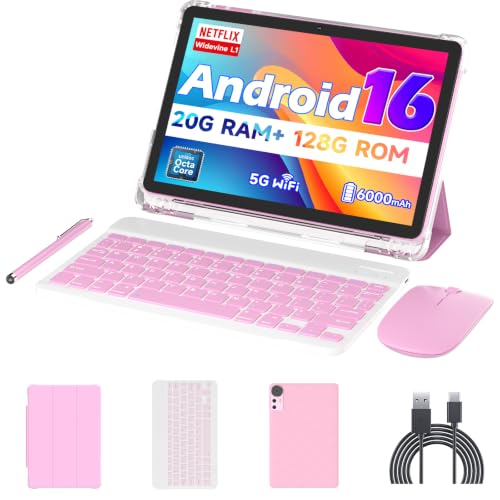
The P60 includes a keyboard, mouse, stylus, protective case, charger, and Type-C cable, so the first-use experience is already built around typing, tapping, and carrying it around in one package.
That matters because the biggest savings here is not just the tablet price, but the fact that you do not have to assemble a separate starter kit. The trade-off is that the bundle is aimed at convenience, not premium feel, so the accessories widen the use case more than they redefine it.
Android 16 and the T606 octa-core platform give this tablet a current software base and enough headroom for routine switching between apps, video, and web use.
That matters most for study, family sharing, and casual productivity, where smooth navigation is more important than raw power. It keeps the P60 in a comfortable daily-use lane, while heavy games and more demanding workflows remain outside its sweet spot.
The tablet comes with 256 GB of built-in storage and support for up to 2 TB via microSD, which gives it real breathing room for downloads, photos, offline video, and kid-friendly content.
That matters because a tablet used by more than one person fills up fast, especially when it is also carrying media and school files. The practical upside is less storage anxiety; the limit is that the expansion card is not included, so the roomy setup depends on how you finish the purchase.
The 10-inch screen keeps the tablet easy to hold for reading, streaming, and browsing, while the 1280x800 resolution keeps the hardware cost down.
That matters for buyers who want a simple media tablet with enough space for split attention and casual typing. The compromise is straightforward: it is pleasant for everyday use, but not the kind of panel that makes sharpness the main selling point.
For a student or parent setting this up on a kitchen table, the first thing that matters is how complete the bundle feels. The keyboard, mouse, stylus, and protective case turn the P60 into a ready-made work-and-play setup instead of a bare tablet you have to accessorize later. That matters because the price sits in the low-budget zone for a bundle this full, and the value is strongest when the buyer wants one purchase to cover homework, browsing, and video without adding extras.
The screen is the part that sets the limit. A 10-inch panel with 1280x800 resolution works fine for Netflix, reading, and general browsing, but it is not the kind of display that makes text or small interface elements disappear into the background. On a screen this size, the pixel density works out to about 149 ppi, which is comfortable enough for casual use but still clearly in entry-level territory. That keeps the tablet in the media-and-light-work lane rather than the premium reading or design lane.
Daily fluidity is where the P60 earns most of its praise. The Android 16 setup, T606 octa-core platform, and the expanded RAM configuration line up with the common use case here: switching between video, web pages, notes, and messaging without the tablet feeling overloaded. The one clear boundary is heavier gaming or more demanding app loads, where the smooth everyday story stops being the whole story. For buyers who want a family tablet or a study companion, that boundary is acceptable; for anyone expecting a small gaming machine, it is not.
Battery life is another reason this model makes sense for casual household use. The 8000mAh battery and the repeated long-use feedback fit the kind of day where the tablet moves from couch to desk to car ride and back again without living on the charger. That said, the 10-inch format and full accessory bundle make it more of a stay-around-the-house device than a travel-light companion. It is easy to like as a shared tablet, but not because it disappears in a bag.
Community
The recurring pattern is easy to read: people are happiest when they treat this as a complete budget bundle for study, kids, streaming, and everyday tasks. The disappointments show up when expectations move toward gaming or more demanding performance. The practical lesson is that the P60 works best when the keyboard, stylus, and battery are the reason you buy it, not when you expect a fast-screened performance tablet.
I’ve been using this tablet for a few days and it has honestly exceeded my expectations for the price. The display is clear, the battery lasts long, and the keyboard and stylus make it great for studying, browsing.
This tablet is fast, responsive, and great for both work and entertainment. The keyboard, mouse, and stylus make it feel like a complete productivity package.
| Attribute | VisuPad P60 Current | Suicoey P30 | Nyxolaria CP31M | Bnegynng CP31M |
|---|---|---|---|---|
| Price | $109.98 | $119.99 | $73.99 | $71.99 |
| Screen size | 10 inches | 10 inches | 10.1 Inches | 10 inches |
| Resolution | 1280x800 pixels | 1280x800 pixels | 1280X800 Pixels | 1280 x 800 pixels |
| RAM | 26 GB (4 GB physical + 22 GB virtual) | - | 20GB (4+16Expand) | 20 GB |
| Storage | 256 GB | 256 GB | 128 GB | 128 GB |
| Battery | 8000mAh | 8000mAh | 6000mAh | 6000 mAh |
| Operating system | Android 16 | Android 16 | - | Android 16 |
| Editorial score | 66/100 | 66/100 | 67/100 | 65/100 |
Against a bare-bones budget Android tablet, the VisuPad P60 is the more sensible buy if you want typing and stylus use from day one. The included keyboard, mouse, and case change the value equation immediately, while the 10-inch 1280x800 screen and Android 16 platform keep it firmly in the everyday-use lane. If your priority is just the cheapest screen possible, a simpler slate can still make sense, but it will not feel as complete out of the box.
Compared with the HUIHUANG C90 and URAO X109, the P60 is less about chasing the biggest RAM headline and more about shipping a more rounded bundle for general household use. The HUIHUANG C90 brings a larger 10.95-inch screen and 32 GB RAM, while the URAO X109 lists a 10.1-inch screen and 30 GB RAM. The VisuPad wins when the accessory package and straightforward setup matter more than squeezing out a bigger display or a higher memory number.
The FEONAL 11-inch Android 16 tablet sits closer to a bigger-screen route, with its 11-inch panel and 20 GB RAM setup. That makes it the better lane for buyers who want a little more screen presence for reading or media. The P60 is the better fit when you want a slightly smaller, easier-to-place tablet bundle that still covers study, streaming, and family use without leaning on size as the main selling point.
Compare with
Add a second model to activate the direct comparison.
No products match that filter combination.
The VisuPad P60 makes the most sense for buyers who want a low-cost Android tablet bundle that is ready for schoolwork, browsing, streaming, and family use right away. The keyboard, mouse, stylus, 8000mAh battery, and 256 GB storage combine into a practical package that feels more complete than the price suggests, especially if you value convenience over premium display quality. If you check the current offer, this is the kind of tablet that can be an easy yes for a budget household setup. The clearest reason to skip it is simple: if gaming performance or a sharper screen is central to your purchase, this is not the right lane. The 1280x800 panel and the mixed performance signals keep it from being a do-everything standout, even though the everyday experience is appealing. For buyers who want a dependable starter tablet with accessories included, though, the P60 is the better-documented choice.
It sits between the two, but the keyboard and stylus make it more useful for light study and everyday typing than a plain streaming slate.
Yes, the 256 GB base storage helps, and microSD expansion up to 2 TB gives it room for downloads, photos, and offline video.